
 Add to Chrome
Guide
Recover deleted or missing ChatGPT chats: what really works
If you deleted a ChatGPT chat yourself, it is gone: OpenAI says neither you nor its support team can restore it. But most chats that look lost were not deleted. They were pushed out of the sidebar, archived, moved into a project, or opened in a different account. A thirty-second check finds those. This page gives the check first, then OpenAI's own words on deleted chats, then the places an old copy might still exist, and finally how to make sure it never happens again.
Missing or deleted? A 30-second check
- Search for it. Press Ctrl+K (Cmd+K on a Mac) in ChatGPT and type a word from the chat. Search finds chats the sidebar no longer shows.
- Check Archived chats. Settings → Data controls → Archived chats. Archiving hides a chat; it does not delete it.
- Open your Projects. A chat added to a project leaves the main list and lives inside the project.
- Check the account. A second Google sign-in, a workspace, or the app on your phone may be a different account with its own history.
- Was it a Temporary Chat? OpenAI says temporary chats "don't appear in your chat history unless you save them" (Temporary chat in ChatGPT).
If none of those turns it up, read on; the chat may still be reachable from your browser.
Where missing chats usually are
Trimmed from the sidebar but searchable
The sidebar shows a limited number of recent chats and loads more as you scroll. A chat from months ago is often simply further down than the sidebar has loaded. Search is the reliable way in.
Archived
OpenAI's help page says regular and archived chats "remain saved to your account" and that "archiving a chat does not change its retention period" ( Chat and file retention, read 6 October 2026). Open the archive from Settings → Data controls and press Unarchive.
Moved into a project
A cause the usual guides miss: in a community thread from 2026 (ChatGPT chat history disappears), chats that had been dragged into Projects vanished from the main sidebar. They were still there, inside the project. Open each project and look.
Another account, workspace or Temporary Chat
Signed in with a different email, or in a Business or Enterprise workspace? Each has its own history. And a Temporary Chat was never saved to begin with: OpenAI may keep a copy for up to 30 days for safety purposes, but it is not in your history and there is no way to open it again.
Still in your browser history
Every ChatGPT conversation has its own address. In an older thread (All previous ChatGPT history gone), users whose sidebar was empty found the chat's URL in their browser history and it opened. Press Ctrl+H (Cmd+Y on a Mac), search for "chatgpt.com/c/", and try the entries from the right day. This only works if the chat still exists in your account; a deleted chat's address returns an error.
Can a deleted ChatGPT chat be recovered?
No. OpenAI's retention page is direct about it (read 6 October 2026):
- When you delete a chat, "ChatGPT removes it from your account view immediately" and schedules it "for permanent deletion from its systems within 30 days".
- "You cannot restore a deleted chat in ChatGPT or through OpenAI Support."
- A data export does not help either: "An export cannot restore chats that have already been deleted" (Exporting your ChatGPT history).
- Deleting a conversation also removes its shared link, so a link you sent someone stops working (Sharing conversations).
The 30-day figure is how long OpenAI may take to remove the data from its systems. It is not a window in which you can get the chat back; the deletion is already final from your side on day one.
Places an old copy may still exist
If the chat is deleted, the only hope is a copy made before. Check, in this order:
- An earlier data export. If you ever requested one, the ZIP has every chat that existed at that time, as
conversations.jsonand, in most exports, a browsable HTML file. - Files you saved. Search your Downloads folder and your notes app for a phrase from the chat. A PDF, Word file or Markdown note you made from it survives the deletion.
- A pasted copy. An email, a document or a message where you pasted the answer.
- A shared link. Only if the chat is not deleted: deleting it removes the link too.
Missing chats in Claude and Gemini
Claude: check that you are signed in to the right account, and that the chat is not inside a project. Anthropic's help pages describe how to export your data, not how to restore a deleted chat; treat deletion as final there too. See exporting Claude chats for the routes that exist.
Gemini: conversations live in your Google Account's activity, and Google deletes activity older than 18 months by default unless you change the setting under Settings & help → Activity (Google on Gemini activity). A chat older than that may have been removed automatically. Check myactivity.google.com for the Gemini Apps section, and see exporting Gemini chats.
Never lose a chat again
The one defence that does not depend on remembering is a copy that is made for you. With Backup My AI Chat, Auto-save writes every conversation in your account to a folder on your computer as a Markdown file, then keeps the folder up to date on a schedule. Once a chat is in that folder it is an ordinary file on your disk: outside ChatGPT's reach, searchable, and yours to keep.
- Open Backup My AI Chat from the browser toolbar and go to Auto-save chats to a folder.
- Under Folder, choose a folder on your computer. Chrome asks once whether the extension may edit files in that folder. Auto-save writes nowhere else; one-off exports go to your Downloads folder.
- Under Accounts, tick the services to include. Each one shows whether you are signed in.
- Under Sync, pick how often to check for new and updated chats, then press Sync now. The first run saves your whole history; later runs save only what changed. A service is synced a few chats at a time, and if a site answers "too many requests" the extension slows down for that service rather than failing.
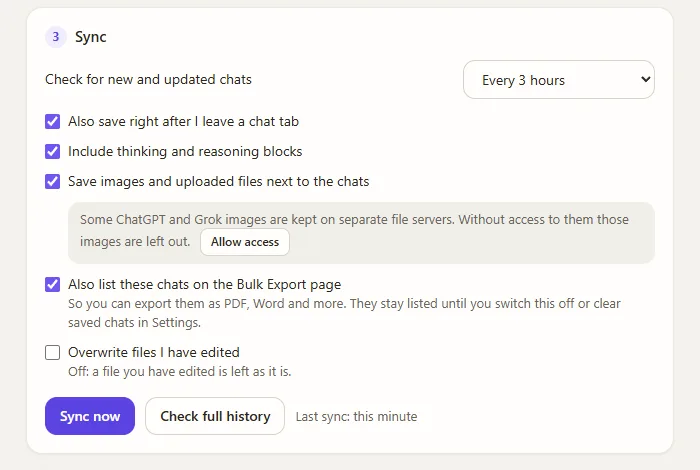
For ChatGPT it also saves archived chats, project chats and Canvas documents, and images and uploaded files where the site allows it. Keep the official data export as a second copy of the whole account, requested now and then; see how to back up all your ChatGPT chats for how the two fit together.
What Backup My AI Chat does not do
- It runs in desktop Chrome and Microsoft Edge. There is no phone, Firefox or Safari version. In Brave and other Chromium browsers, Auto-save has not been tested yet.
- It reads the chats in the account you are signed in to. It cannot bring back a chat that is already deleted.
- Auto-save runs while the browser is open. A run that fell due while the browser was closed is caught up when it starts.
- Gemini, Grok and DeepSeek are read through one of their own tabs: Sync now opens one in the background and closes it; scheduled runs save those services only while such a tab is already open.
- Each AI service's terms restrict automated access to some degree, and none of them has approved this tool. Check the terms of the services you use.
- It cannot bring back a chat that was deleted before it was installed.
Questions
Does OpenAI keep deleted chats for 30 days so I can restore them?
No. The 30 days is the time OpenAI may take to remove the data from its own systems. The chat leaves your account immediately, and OpenAI says it cannot be restored by you or by support.
Will OpenAI support restore my chats if I ask?
OpenAI's help page says no: "You cannot restore a deleted chat in ChatGPT or through OpenAI Support."
Does archiving delete a chat?
No. An archived chat stays in your account and can be unarchived from Settings → Data controls → Archived chats (Deleting and archiving chats).
Does deleting a chat delete its shared link?
Yes. OpenAI's sharing page says deleting a conversation removes its shared conversation link.