 Backup My AI Chat
Gemini
How to export Gemini chats to PDF, Docs or Markdown
Gemini can send a single response to Google Docs or Gmail, share a whole conversation as a public link, and hand over your activity through Google Takeout. It has no export of a whole chat to PDF or Markdown. To get a Gemini conversation as a PDF, Word or Markdown file on your own computer, use Backup My AI Chat.
Gemini's options at a glance
| Option | Covers | You get | Main limit |
|---|---|---|---|
| Export to Docs | One response | A new Google Doc in Drive | One response at a time, not the conversation |
| Share conversation | One whole chat | A public link | Anyone with the link can read it; not a file |
| Google Takeout | All your Gemini Apps activity | An archive, hours to days later | Easy to tick the wrong box; activity data, not documents |
| Backup My AI Chat | One chat or many | PDF, Word, Markdown, text, JSON or image files | Desktop Chrome and Edge only |
Why back up: activity is auto-deleted
Gemini does not keep conversations indefinitely by default. Google says Gemini Apps activity older than 18 months is auto-deleted unless you change the setting, and the choices are 3, 18 or 36 months. You find it under Settings & help → Activity (Google on activity). A chat you may want in three years needs a copy somewhere else.
Export to Docs, Gmail and Sheets
Below a response, click Share & export, then Export to Docs. Gemini saves a new document in your Google Drive. Draft in Gmail does the same into an email draft, and a table has its own Export to Sheets button (Google on exporting responses).
Each of these exports the one response you clicked under. A twenty-turn conversation means twenty exports.
Share a conversation
Below a response, choose Share, then Share conversation. The public link shares the entire conversation, and anyone who has it can read the chat. You manage links under Settings & help → Your public links (Google on sharing). Useful for showing a chat to someone; not a private copy.
Google Takeout
Takeout is the official bulk route, and one detail trips most people up.
- Go to takeout.google.com and choose Deselect all.
- Scroll to My Activity and tick it. Open All activity data included, choose Deselect all, tick Gemini Apps and confirm.
- Choose Next step, pick how to receive the archive and select Create export.
A whole chat as a file, with Backup My AI Chat
- Add Backup My AI Chat to Chrome or Edge and open the conversation on gemini.google.com.
- Press Export and choose PDF, Word, Markdown, text, JSON or image.
- To keep only some messages, open Custom Export and tick the ones you want.
The export holds the whole conversation, your prompts included, in one file. Code blocks, tables, lists and links keep their formatting. Files are made in your browser and saved to your Downloads folder; nothing is uploaded, and nothing is added to your Google Drive.
Every Gemini chat, kept in a folder
Auto-save writes each Gemini conversation to a folder as a Markdown file and keeps it current, so the 18-month clock stops mattering.
- Open Backup My AI Chat from the browser toolbar and go to Auto-save chats to a folder.
- Under Folder, choose a folder on your computer. Chrome asks once whether the extension may edit files in that folder. Auto-save writes nowhere else; one-off exports go to your Downloads folder.
- Under Accounts, tick the services to include. Each one shows whether you are signed in.
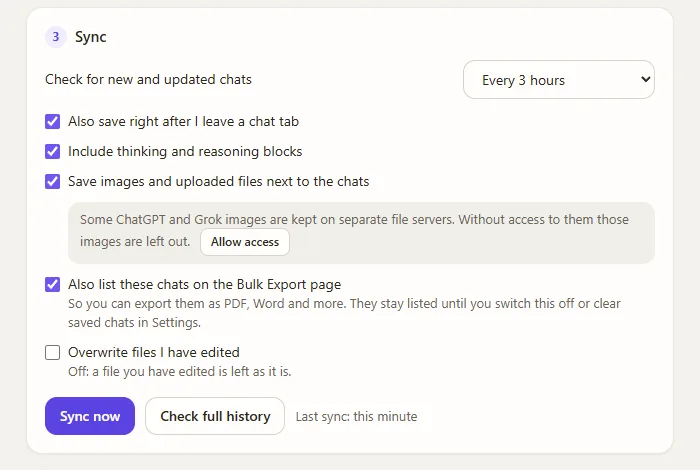
- Under Sync, pick how often to check for new and updated chats, then press Sync now. The first run saves your whole history; later runs save only what changed. A service is synced a few chats at a time, and if a site answers "too many requests" the extension slows down for that service rather than failing.
Gemini chats go into a Gemini subfolder, next to the folders for your other assistants, with your questions, Gemini's answers, its thinking where shown, and notes of any images. Each file is ordinary Markdown whose header lists title, source, conversation id, link, created, updated, model, message count and tags, followed by the conversation with one heading per message.
Limits to know
Questions
Can you export a conversation from Google Gemini?
Gemini itself exports one response at a time to Google Docs or Gmail, and shares a whole conversation as a public link. For a whole conversation as a file, use Google Takeout for everything at once or Backup My AI Chat for the chat you are in.
Does Export to Docs export the whole conversation?
No. Google's help page describes it as an action below a response, and it saves that response to a new document. Sharing is the Gemini feature that covers an entire conversation.
Why is my Gemini history missing from my Takeout export?
Most likely because the "Gemini" product was ticked, which holds Gems. Chats are exported from My Activity, with Gemini Apps selected.
Can I save a Gemini chat as a PDF?
Gemini has no PDF export for a chat. Open the chat, press Export in Backup My AI Chat and choose PDF, or print the page from your browser and check the result.
How long does Gemini keep my chats?
By default, activity older than 18 months is deleted automatically. You can change this to 3 or 36 months in Gemini's Activity settings.